Project structure
One installable plugin package (netbox_opennms/) plus the Docker
test harness, the quickstart demo, and CI. The package is layered bottom-up —
the OpenNMS port at the base, pure translation in the middle, UI on top.
netbox-opennms-plugin/
├── netbox_opennms/            # the plugin package
│   ├── __init__.py            #   PluginConfig + single-sourced __version__
│   ├── client/                #   OpenNMS REST client + discovery (the only I/O port)
│   ├── catalog.py             #   cached detector/policy/asset catalog (live + overlay)
│   ├── presets.py             #   curated preset overlay (labels/defaults)
│   ├── models.py  choices.py  #   Requisition, detectors, policies, overrides, mappings
│   ├── migrations/            #   schema migrations
│   ├── membership.py          #   filter → members; conflict resolution
│   ├── filtersets.py  derivation.py  validation.py
│   ├── enrichment.py          #   NetBox attribute → asset/metadata resolver
│   ├── translation/           #   pure render: requisition + foreign-source XML
│   ├── jobs.py  dryrun.py  signals.py   # sync/remove jobs, dry-run diff, reconciler
│   ├── forms.py  views.py  tables.py  navigation.py  urls.py  api/  templates/
│   └── tests/                 #   unit suite + live-OpenNMS integration + spike
├── compose.yml                # test stack (Postgres + Redis + NetBox test runner)
├── compose.integration.yml    # overlay: disposable OpenNMS Horizon 36
├── Makefile                   # every CI + dev command (lint/test/build/integration)
├── quickstart/                # runnable demo: NetBox UI + worker + OpenNMS + seed
├── docs/                      # this page + screenshots
└── .github/workflows/ci.yml # lint · unit · gated live integrationclient/; translation/ is pure (no network, no DB
writes); the UI reads pre-resolved specs from membership.py.
Release workflow
The version is single-sourced, main requires signed commits, and
a release is a signed tag plus a GitHub release. Publishing the release
triggers the PyPI upload automatically (Trusted Publishing).
- Bump the single source of truth —
__version__innetbox_opennms/__init__.py(pyproject reads it dynamically) — on a branch, and open a PR. - CI must be green (
make verify+ wheel build). Merge via squash or rebase. - Tag the release commit and push, then cut the GitHub release:
git tag -a v0.0.1 -m "netbox-opennms-plugin 0.0.1 — first public release"
git push origin v0.0.1
gh release create v0.0.1 --verify-tag --notes-file NOTES.mdmain protection ruleset
enforces required_signatures, so configure commit signing once —
git config commit.gpgsign true with a user.signingkey
set — or merges will be blocked. Tags are signed too (tag.gpgsign).
Contributing
Issues and pull requests are welcome. One focused change per PR; CI runs the same Makefile targets you run locally, so there are no surprises.
- Branch per change off
main; open a PR. - Conventional Commits —
feat/fix/docs/refactor/test/chore/ci, with a scope where it helps. - Sign your commits — DCO sign-off and a cryptographic
signature:
git commit -swithcommit.gpgsign true. - SPDX header on every new/edited source file
(
SPDX-License-Identifier: MIT). - Green before you push —
make verify(ruff + the full unit suite) must pass; CI enforces it.
Build from source
Python 3.12+. Install editable for development, or build the distributables.
# editable install into your NetBox virtualenv
pip install -e .

# install a release from PyPI
pip install netbox-opennms-plugin

# build the wheel + sdist into dist/ (also asserts the wheel ships its templates)
make buildnetbox_opennms.__version__ at build
time — the build never imports NetBox, so make build works without
a NetBox install.
Dev environment
No local NetBox install needed. The Makefile runs everything in a throwaway Postgres/Redis/NetBox container, so local and CI use the identical commands.
| Command | What it does |
|---|---|
make verify | ruff lint + the full unit test suite (what CI gates on) |
make test | the unit test suite only |
make lint | ruff (line length 88) |
make makemigrations | generate + verify migrations |
make build | wheel + sdist into dist/ |
DEVELOPER = True in NetBox's configuration.py
only if you run makemigrations outside the harness.
End-to-end tests
The unit suite never depends on OpenNMS. The live round-trip boots a disposable
OpenNMS Horizon 36 and drives real requisition imports — it is gated on
OPENNMS_LIVE_URL, runs nightly in CI, and on demand.
# boot a throwaway OpenNMS Horizon 36 and run the live round-trip
make integration

# the exploratory spike (captures real /foreignSourcesConfig payloads)
make integration-spike
Under the hood, compose.integration.yml overlays a disposable
OpenNMS onto the test stack and points the test container at it via
OPENNMS_LIVE_URL. Without that variable set, the live tests
skip, so make verify stays green with no OpenNMS around.
Local test environment
To click through a real feature — author a Requisition, add detectors/policies, dry-run, and Sync a node into OpenNMS — bring up the seeded quickstart stack: NetBox (UI + worker) and a disposable OpenNMS Horizon 36. It lives in quickstart/.
Run it
From the repo's quickstart/ directory:
# NetBox UI + background worker only (point the plugin at your own OpenNMS)
docker compose up -d

# …or the full self-contained loop incl. a disposable OpenNMS Horizon 36
docker compose --profile opennms up -d
First boot runs migrations, creates the superuser, and initializes OpenNMS's
schema, so allow a few minutes (docker compose ps until healthy;
docker compose logs -f netbox to watch).
| Service | URL | Login |
|---|---|---|
| NetBox | http://localhost:8000 | admin / admin |
OpenNMS (with --profile opennms) | http://localhost:8980/opennms | admin / admin |
Seed test data
Load sample Devices, VMs, and Requisitions so there's something to sync
immediately (idempotent — everything is get_or_create'd):
./seed.sh
# …or:  docker compose exec -T netbox \
#         /opt/netbox/venv/bin/python /opt/netbox/netbox/manage.py shell < seed.py
It builds 3 sites × a few roles, devices with multiple interfaces + additional
IPs, VMs on a site-scoped cluster, and 5 Requisitions (each a site+role filter
with inline detectors and declared services) — including a multi-node Foreign
Source mixing devices and VMs, a requisition with an OpenNMS-unknown
location (trips the no-Minion warning), per-object overrides, and one
unmonitored object. Edit
seed.py
to taste.
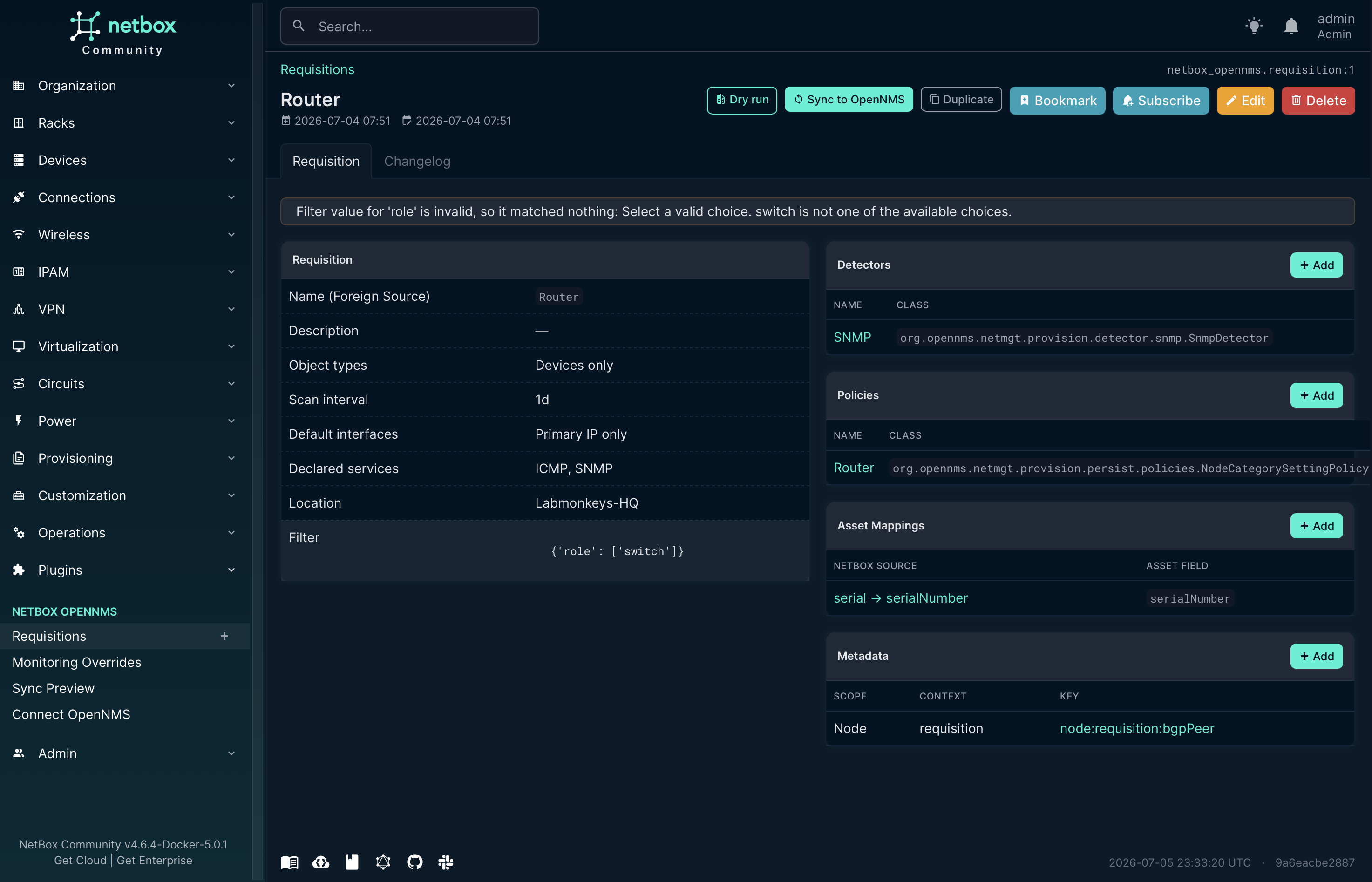
Do a sync (Web UI)
Open http://localhost:8000/ (admin / admin) → Plugins → NetBox
OpenNMS:
- (or run
./seed.shand skip to step 4) Create the prerequisites (a Site, Device Role, Manufacturer + Device Type, then a Device with a primary IP). - Requisitions → Add: name it (e.g.
core-switches), set a filter that selects your device — e.g.{"role": ["<role-slug>"]}or Import from Saved Filter — and use the panel Add buttons to attach detectors, policies, asset mappings, and metadata. - Dry run to preview, per node, exactly what a Sync would push.
- Sync to OpenNMS — the OpenNMS Sync Status panel shows
submitted→succeeded-accepted(the worker runs the job); the node appears in OpenNMS under the Requisition's Foreign Source name.
/plugins/opennms/connection-test/) — it probes reachability +
credentials before you sync.
Point at your own OpenNMS
Edit
configuration/plugins.py
— set opennms_url, opennms_username,
opennms_password — then docker compose up -d (no
--profile opennms). The plugin needs an account that can read/write
requisitions and trigger imports.
How it's wired
- The plugin is mounted from the repo root
(
../ → /source) onPYTHONPATH— no rebuild on code changes; restart thenetbox+netbox-workercontainers to pick them up. netbox-workerrunsmanage.py rqworker— required, because Sync/Remove/Move run as background jobs.configuration/plugins.pyis mounted at/etc/netbox/config/plugins.pyto setPLUGINS+PLUGINS_CONFIG.
Tear down
docker compose --profile opennms down -v # -v also drops the data volumes